

5 Free AI Tools That Replace a $2,000/Mo VA (2026)
I canceled a $2,100/month VA contract in February. Not because the work was bad — because I found 5 free tools to replace my virtual assistant and do most of it better.
That’s not a brag. It’s a confession, because it took me longer than I’d like to admit to realize the tools were already there. I was paying for convenience I no longer needed.
This post is the breakdown I wish someone had sent me 12 months earlier. Every tool is free. None of this requires code. And if you spend 3 hours setting it up once, the system runs itself after that.
If you want the Notion template I use for my weekly content calendar, I’ve dropped it inside my free AI Automation Playground community — link’s at the end.
📋 Table of Contents
🎯 Key Takeaways
- 82% of small business employers have now invested in AI tools, with the median business using five simultaneously. (SBE Council, 2026)
- AI automation returns 10–40% of daily work time for solopreneurs handling content, email, and admin. (AdAI Research, 2026)
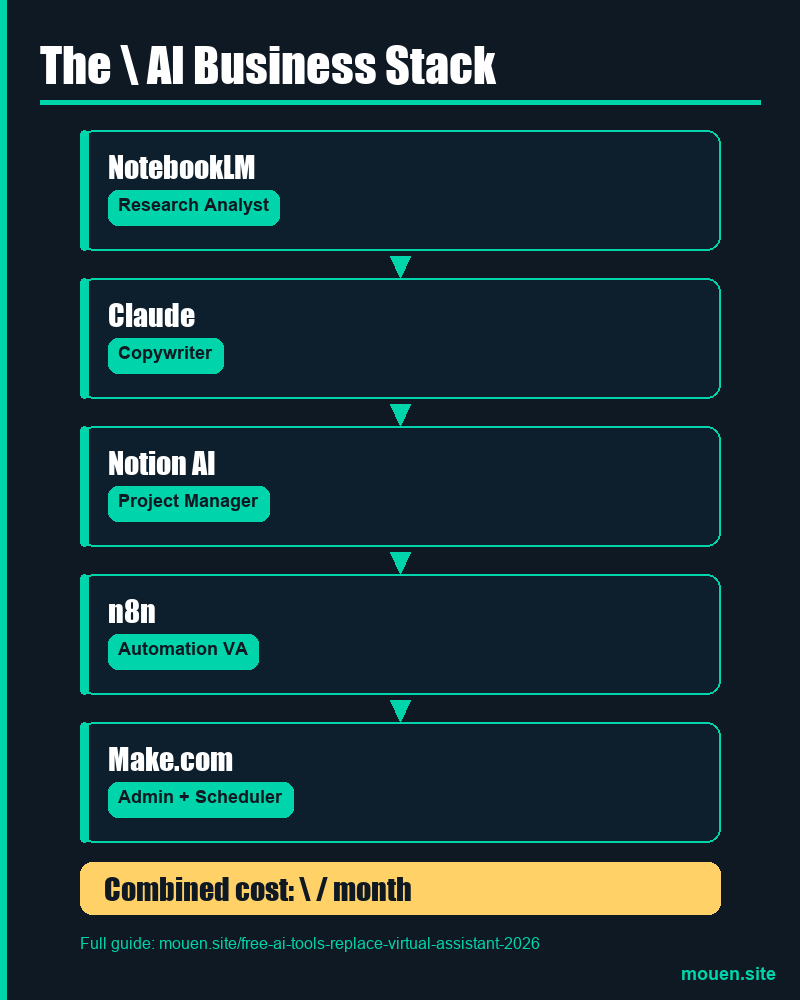
- The 5-tool stack in this post replaces research, copywriting, automation, project management, and admin — combined cost: $0/month.
- Setup time: approximately 2–3 hours once. After that, the workflow runs automatically.
Why “Free AI Tools” Advice Usually Fails (And Why This Is Different)
In 2026, according to the SBE Council’s small business technology survey, 82% of small employers have invested in AI tools and the median business now runs five of them simultaneously. That’s the good news. The bad news? Most of the free AI tool content online hands you a list of apps with zero instruction on how to make them work together.
You end up with 6 browser tabs and the same amount of admin work.
What you actually need isn’t more tools — it’s one connected workflow where the output of one tool feeds the next automatically. That’s what this post builds.
The 5 tools below were chosen because they’re genuinely free (not “free trial” tricks), they cover every major task a VA handles, and — critically — they connect to each other. Remove any one and the system still partially works. Keep all five and you’ve got something that runs while you sleep.

The 5 Free AI Tools That Replace a Virtual Assistant (And What Each One Does)
1. Notion AI (Free Tier) — Replaces Your Research Assistant & Project Manager
✅ Replaces: Research Assistant + Project Manager
Notion’s free tier includes AI features that would have cost $400/month in VA time three years ago. You paste a voice memo or a messy brain dump into a Notion page, hit the AI button, and it structures that content into a project plan, content calendar, or task list — formatted, categorized, and ready to go.
Real use case: Every Monday, I record a 10-minute voice memo covering what I want to publish that week. I paste the transcript into Notion AI. Within 60 seconds, I have a complete content calendar with titles, angles, target keywords, and publishing dates — all organized in a Notion database. That used to be a 2-hour VA task.
💻 Free tier includes: Unlimited pages, basic AI assistance (20 AI responses/day — enough for solo use), databases, and calendar views.
2. n8n (Free Self-Hosted or Cloud Free Tier) — Replaces Your Automation VA
✅ Replaces: Automation VA
n8n is what separates this stack from every “free AI tools” list you’ve read before. It’s the connective tissue — the automation engine that links every other tool in this workflow without a single line of code.
Think of it as a no-code version of hiring someone to sit and watch your business systems all day, triggering actions when things happen.
Real use case: A new lead fills in a contact form on your site. n8n detects that submission and immediately does three things: creates a project card in Notion, sends the lead a personalized welcome email, and posts a Slack notification to you. No manual input. Happens in seconds. Setting up that workflow takes about 45 minutes the first time. After that, it runs forever.
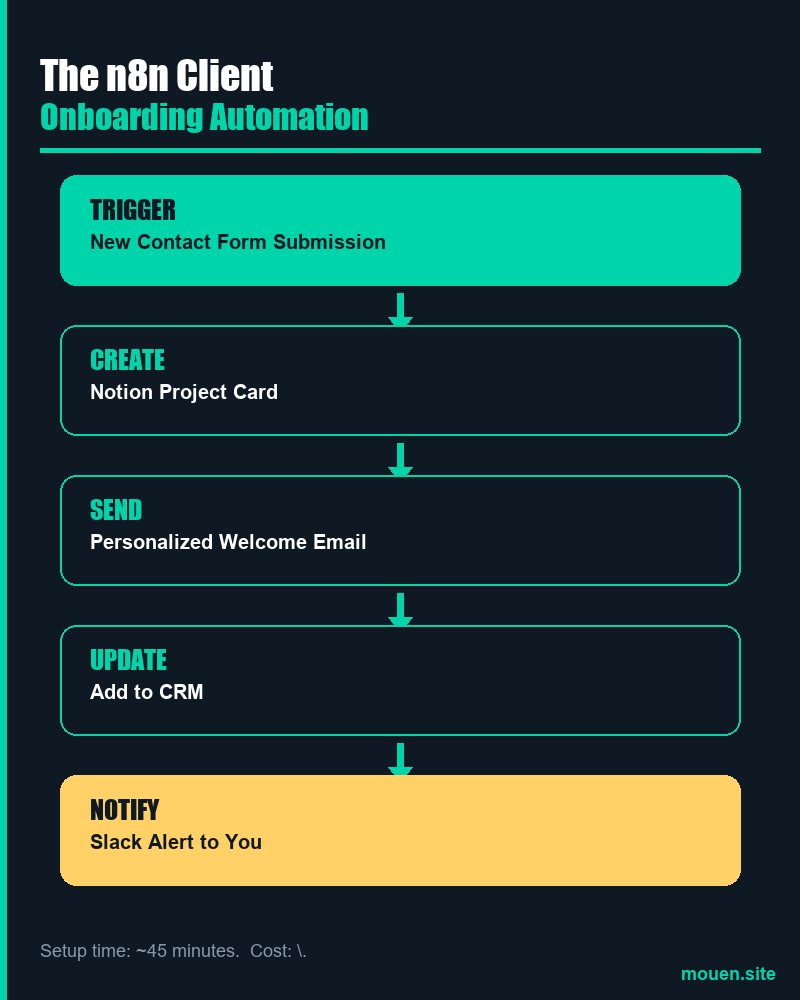
💻 Free tier includes: Self-hosted version is completely free with no usage limits. The cloud version includes 5 active workflows free — enough for a one-person business.
🎁 Free Resource: The exact n8n workflow JSON I use to automate client onboarding is available as a free download inside my Skool community. Grab it here →
3. Claude.ai (Free Tier) — Replaces Your Copywriter & Email Drafter
✅ Replaces: Copywriter + Email Drafter
Claude is the AI model powering this post. The free tier at claude.ai gives you access to Claude Sonnet — which handles long-form writing, client email drafting, proposal generation, and research synthesis better than any paid copywriter I’ve worked with for routine tasks.
Real use case: Paste a client brief (even a messy one from an email). Ask Claude to write a full project proposal. You get a complete, professional draft in 90 seconds — including an executive summary, deliverables list, timeline, and pricing framework. You edit it for 10 minutes. You send it. That’s $200–$400 in copywriting time, gone.

Where it beats ChatGPT for this use case: Claude handles longer documents better and produces fewer generic filler phrases. For client-facing work — proposals, SOPs, onboarding guides — it consistently produces output that needs less editing.
💻 Free tier includes: Access to Claude Sonnet with daily usage limits. For 1–3 major writing tasks per day, the free tier is sufficient.
4. Google NotebookLM (Free) — Replaces Your Research Analyst
✅ Replaces: Research Analyst
NotebookLM is the most underrated tool in this stack. Google’s AI research assistant lets you upload PDFs, paste URLs, drop in YouTube transcripts, and then ask it questions across all of those sources simultaneously.
Real use case: I dump 10 competitor blog posts into a NotebookLM notebook. Then I ask: “What content gap do all of these miss?” It reads across all 10 sources, identifies common patterns and blind spots, and returns an answer in 30 seconds. A research analyst charging $75/hour would take half a day to produce the same output. That’s where your next content angle comes from.
- Upload all client documentation and ask questions about their brand voice, past campaigns, and goals
- Paste in industry reports and extract the key stats relevant to your niche
- Create a “knowledge base” for each client that you can query instantly before every call
💰 Cost: $0. It’s free with a Google account. No usage limits disclosed. The most powerful free research tool available right now.
5. Make.com (Free Tier — 1,000 ops/month) — Replaces Your Admin & Scheduling VA
✅ Replaces: Admin + Scheduling VA
Make.com is a visual automation builder — similar to n8n but with a cleaner interface and native integrations with 1,500+ apps. Where n8n handles your core business automations, Make handles the admin and content scheduling side.
Real use case: I maintain a Google Sheet with all my planned Instagram posts. Make monitors that sheet, and when a new row appears, it automatically sends the image and caption to Buffer for scheduling. No logging into Instagram. No remembering to post. It just happens.
⚠️ Free tier limit: 1,000 operations/month. One operation = one action. At 30 posts/month that’s ~90 ops — well within the free tier for most solopreneurs.
The thing most people don’t realize about Make vs. n8n: They’re not either/or. n8n handles complex logic-heavy workflows (like client onboarding with conditional branching). Make handles simpler, high-volume automations (like content scheduling). Using both on their free tiers gives you the best of both without paying anything.
The Full Workflow That Connects All 5 Free AI Tools
Individual tools are nice. A system that runs without you is a business. Here’s the exact weekly workflow that replaces what a virtual assistant used to do:
🗓️ Weekly Schedule (Total Active Time: ~55 Minutes)
| Day | Task | Tool | Time |
|---|---|---|---|
| Monday | Research content gaps & topic angles | NotebookLM | 15 min |
| Tuesday | Draft content from research angle | Claude.ai | 30 min |
| Wednesday | Organize into calendar & schedule | Notion AI | 10 min |
| Thu – Fri | Automated publishing, email, admin | n8n + Make.com | 0 min |
According to AdAI Research’s 2026 compilation, AI automation returns 10–40% of daily work time for solopreneurs handling content, email, and admin tasks. On the conservative end, that’s 90 minutes back per 8-hour day. The 55-minute workflow above is the conservative end, consistently.
What This Free AI Stack Actually Saved (Real Numbers)
Here’s what the math looks like for replacing a virtual assistant with free AI tools:
| Item | Before (VA) | After (Free AI Stack) |
|---|---|---|
| Monthly cost | $2,100 | $0 |
| Weekly admin hours | ~20 hours | ~8 hours |
| Setup time | N/A | ~2–3 hours (once) |
| Monthly time saved | — | ~48 hours |
The $2,100/month figure isn’t padded. It was a part-time VA at $35/hour, working 60 hours per month across research, copywriting, scheduling, and email management.
The free AI stack doesn’t do 100% of what a skilled VA does. It doesn’t handle judgment calls, client relationship nuance, or unexpected situations. But for the repeatable, structured tasks that made up 80% of that contract? The stack handles them better and faster.

Frequently Asked Questions
Is Claude really free?
Yes. Claude.ai offers a free tier with access to Claude Sonnet and daily usage limits. For 1–3 significant writing or research tasks per day, the free tier is sufficient for a solo operator. Claude Pro starts at $20/month if you need higher daily limits or access to the most powerful models. Most freelancers and solopreneurs don’t need the paid plan to get real value.
Can n8n actually replace a virtual assistant?
For automation tasks — yes, fully. n8n handles anything that follows a predictable pattern: “when X happens, do Y and Z.” Client form submissions, email triggers, CRM updates, scheduled reports, Slack notifications. Where n8n can’t replace a VA is in tasks requiring judgment or relationship management. Honestly: n8n replaces the automatable 60–70% of a VA’s workload.
What’s the catch with Make.com’s free tier?
The 1,000 operations/month limit. One operation is roughly one action (e.g., reading a row from a Google Sheet = 1 op; sending an email = 1 op). A simple “post Instagram content from a Google Sheet” scenario uses 2–3 ops per post. At 30 posts per month, that’s ~90 ops — well within the free tier. If you’re running complex multi-step automations daily, you’ll hit the ceiling. Make’s Core plan is $9/month at that point.
Do I need to know how to code to use this stack?
No. Notion AI is purely conversational. n8n and Make use visual drag-and-drop builders. Claude and NotebookLM are entirely text-based. The only technical step is self-hosting n8n (which requires running one command in a terminal). If you use n8n’s cloud free tier instead, even that step disappears.
Can I use this as a freelancer, not just a business owner?
Absolutely — and freelancers arguably get more out of this stack than business owners do, because every hour saved is an hour you can bill. The n8n client onboarding automation is built specifically for service freelancers. The Claude proposal workflow is designed around client work. The NotebookLM research notebook works perfectly for building a client knowledge base before kick-off calls. Want to take it further? Check out our guide to AI side hustles that pay $100+/day.
What to Do Next: Set Up Your Free AI Stack in 65 Minutes
Set up the stack in this order:
💡 Also worth reading: Once your free AI stack is running, the next step is monetizing it. See our full guide: 10 Real AI Side Hustles That Pay $100+/Day in 2026 →
- Notion free account — takes 5 minutes. Create one database for your content calendar.
- NotebookLM — takes 3 minutes. Create one notebook, add 5 competitor blog URLs.
- Claude.ai — takes 2 minutes. Bookmark it. Use it tomorrow for one real task.
- Make.com — takes 10 minutes. Connect your Google Sheet to Buffer for content scheduling.
- n8n — takes 45 minutes. Build one automation: contact form → Notion task + welcome email.
That’s it. The whole setup, in about 65 minutes. The hardest part isn’t the tech. It’s believing the system will actually work after years of doing this manually. It will. Give it two weeks before you judge it.
🚀 Join 150+ Creators Already Automating Their Businesses
It’s free. Every workflow I share here lives inside the AI Automation Playground in ready-to-use format — including the exact n8n client onboarding JSON, the Notion content calendar template, and the Make.com Instagram scheduling scenario.
Join the Free Community →Sources
- SBE Council, “The AI Tools Small Businesses Are Using,” April 25, 2026. https://sbecouncil.org/2026/04/25/the-ai-tools-small-businesses-are-using/
- AdAI Research, “AI Automation Statistics 2026,” retrieved 2026-05-08. https://adai.news/resources/statistics/ai-automation-statistics-2026/
- MyOutDesk, “Virtual Assistant Statistics 2026,” updated February 6, 2026. https://www.myoutdesk.com/blog/virtual-assistant-statistics/